RAID Array Failed? Do NOT Touch It. Here's Why — Mumbai Data Recovery Expert Explains

Your RAID array just went offline. The NAS won't mount. The server is showing a degraded array. One or more drives have failed. And everything — client files, business databases, years of work — is sitting inside that array, inaccessible.
RAID recovery is one of the most complex and misunderstood areas of data recovery. Well-meaning IT teams and business owners make the same critical mistakes every time — mistakes that turn a recoverable situation into permanent data loss. This guide explains what RAID failure actually means, why you should stop what you're doing right now, and what the correct path forward looks like.
⛔ Stop right now if you are about to: rebuild the array, initialise a new RAID, run CHKDSK, or replace the failed drive and force a rebuild. Read this first.
🧱 What is RAID and Why Does it Fail?
RAID — Redundant Array of Independent Disks — combines multiple hard drives into one logical unit. Businesses use RAID for speed, storage capacity, and redundancy. It is commonly found in NAS devices, servers, desktop workstations, and surveillance systems.

⚡ RAID 0 — No redundancy. If ONE drive fails, ALL data is lost immediately. Recovery is complex but often possible.
🛡️ RAID 1 — Mirror. One drive can fail safely. But if the second also fails or the controller fails — total loss.
⚖️ RAID 5 — One drive can fail. But if a second drive fails during rebuild — which is common — data loss is critical.
🔐 RAID 6 — Two drives can fail simultaneously. Still vulnerable to controller failure and corruption.
🔄 RAID 10 — Mirror plus stripe. Failure of the wrong drive combination still causes total data loss.
🚨 The 5 Mistakes That Destroy RAID Data Permanently
These are the most common and most damaging things people do when a RAID fails. Each one can turn a recoverable situation into complete data loss.
❌ Mistake 1 — Forcing a rebuild without checking all drives. If remaining drives have bad sectors, forcing rebuild destroys parity data permanently.
❌ Mistake 2 — Auto-rebuild after replacing the failed drive. Rebuild puts enormous read stress on already-stressed remaining drives — triggering further failures.
❌ Mistake 3 — Initialising or formatting the array. This overwrites RAID metadata — the map of how data is distributed. Without it, recovery becomes dramatically harder.
❌ Mistake 4 — Running CHKDSK or fsck on individual drives. These tools are for healthy volumes. On a failed RAID drive they cause further filesystem damage.
❌ Mistake 5 — Swapping drives between slots. RAID arrays are position-sensitive. Moving a drive to a different slot corrupts the rebuild sequence.
🟡 Golden rule of RAID failure: Power it down. Leave all drives exactly where they are. Call a specialist.
✅ What You SHOULD Do the Moment RAID Fails
🔴 Power down the NAS, server, or workstation immediately. Do not attempt any further access.
📋 Write down the RAID configuration — RAID level, number of drives, drive order, controller make and model, and the error message shown.
📸 Photograph the drive bays showing drive positions before removing anything.
🚫 Do not remove any drives until a recovery specialist advises you to.
📞 Contact a professional data recovery service immediately — the sooner you call, the more options are available.
🔬 How Professional RAID Recovery Works
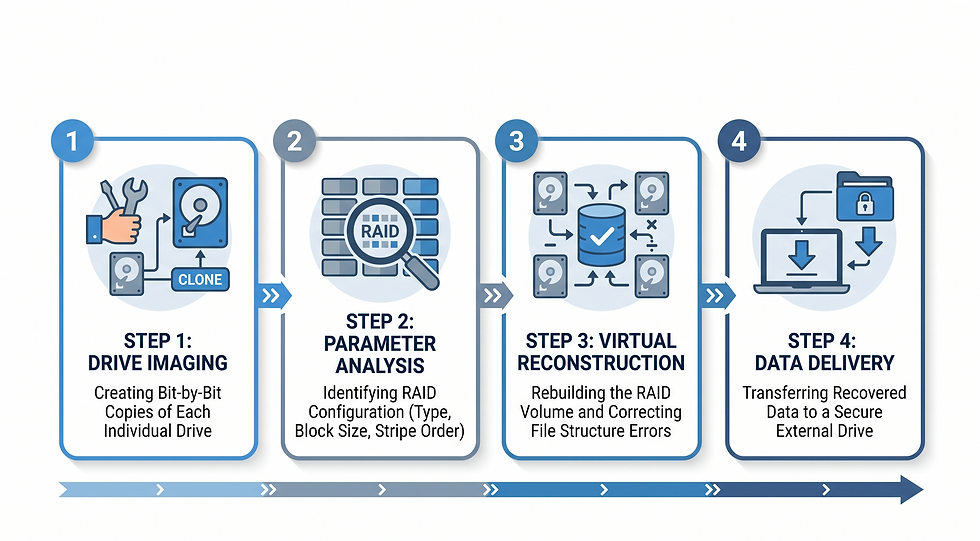
Professional RAID recovery is a multi-stage process requiring specialist tools, deep technical knowledge, and extreme caution:
🔍 Step 1 — Each drive is imaged first. Sector-by-sector copies of every drive are made. Recovery is attempted on the copies — never the originals.
🧩 Step 2 — RAID parameters are manually analysed. Chunk size, stripe order, parity rotation, and drive sequence are determined — even if controller metadata is damaged.
🏗️ Step 3 — The virtual RAID is reconstructed in software — without touching the original drives.
📂 Step 4 — Data is extracted, verified for integrity, and delivered on new healthy storage media.
📦 RAID Configurations We Recover
✅ RAID 0, 1, 5, 6, 10 — all standard configurations
✅ NAS devices — Synology, QNAP, WD, Seagate, Buffalo and more
✅ Hardware RAID controllers — Dell PERC, HP SmartArray, LSI, Adaptec
✅ Software RAID — Windows Dynamic Disks, Linux mdadm RAID
✅ Failed rebuild scenarios — even where a rebuild attempt has already been made
✅ Corrupted RAID metadata and missing parity scenarios
🔒 Confidentiality for Business Data Recovery
RAID systems typically hold the most sensitive data in any business — client records, financial data, HR files, intellectual property. Every RAID recovery case is handled with complete confidentiality. For corporate clients, we sign an NDA before any drives are handed over or shipped to us.
🟡 We work with IT teams, legal firms, accounting practices, medical offices, and businesses of all sizes across India.
📞 RAID Failed? Call Us Before You Do Anything Else.
Based in Mumbai. Serving businesses and IT teams across India — devices can be couriered to us securely. We assess every RAID case individually and give you an honest picture of recovery feasibility before any work begins.
📞 Call or WhatsApp: +91 98333 48884 | ✉️ Email: info@9833348884.com | 🕐 Mon–Fri, 11:00 am to 6:00 pm IST | 📍 Malad West, Mumbai – 400064


Comments